Company Information
Set up your workspace subdomain, keep your account details up to date, and connect your Elasticsearch clusters.
Overview
The Company Information page is where you configure your workspace. The most important step here is setting your subdomain — this becomes the base URL for all APIs you create. You only need to do this once before creating your first API.
For example, if your subdomain is acme, your APIs will be served at
acme.searchapi.net.
Company Information Form
Navigate to My Account → Company Information in the dashboard sidebar. Fill in the fields and click Save:
- Company Name — your company or organisation (required)
- Subdomain — your permanent workspace identifier (required, see rules below)
- Phone — contact phone number
As you type your subdomain, a live preview is shown next to the field label so you can see exactly what your workspace URL will look like before saving.
When saving with a subdomain for the first time, a confirmation dialog will appear. Once confirmed, the subdomain is permanently locked and cannot be changed.
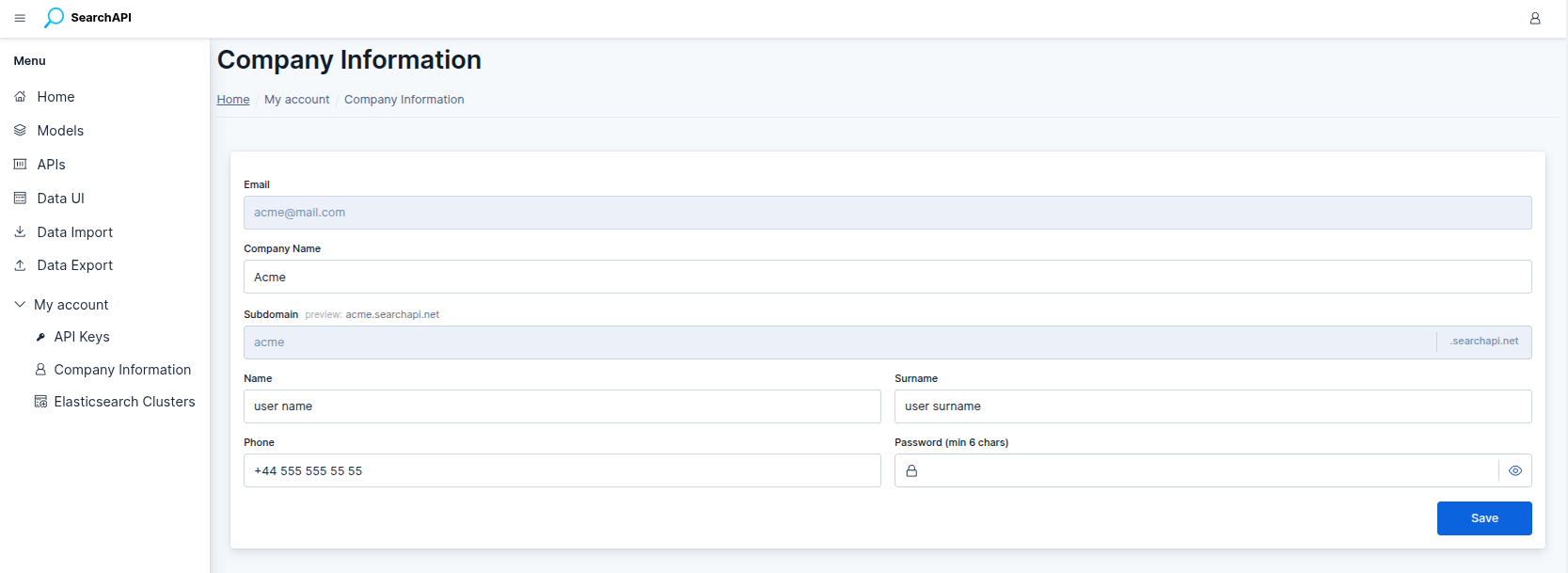 Company Information form screenshot
Subdomain Rules
Your subdomain must follow these rules:
- Only lowercase letters (
a–z) and numbers (0–9) are allowed — no spaces, hyphens, or special characters - Maximum 50 characters
- Certain words are reserved (e.g.
www,api,admin) — the form will notify you if your chosen subdomain is unavailable - Permanent — once saved, the subdomain is locked and cannot be changed