Guide 7: Manage your endpoints
Review endpoint fields and mappings, edit endpoint settings and methods, and see why models become locked.
Chapters
Transcript
Show the transcript
Welcome back. In this guide, you'll edit your endpoint, and see what it changed for your models.
Let's start with the list. Endpoints are grouped by path. Open one to see the fields it works with. Mappings shows how the group is stored in the search index. Here's brand: its id, plus only the fields you marked visible.
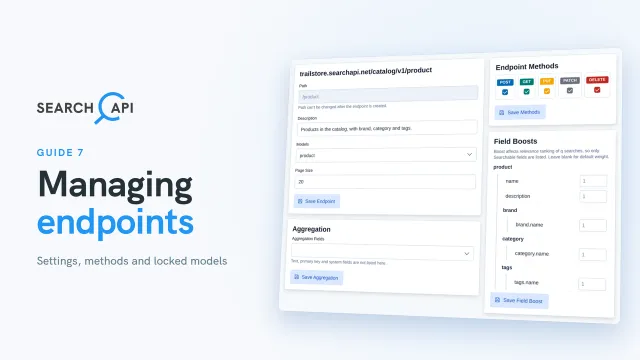
So, how do you manage a group? Click Edit. One page covers every method in it. The path is fixed once it's created. A description is optional, but it's worth adding. It appears in the endpoint list and in your Swagger documentation. The model can be swapped while this version is a draft. Models already used in this version are greyed out, and switching resets this endpoint's search settings. Page size sets how many products a list returns. It starts at twenty. Save Endpoint.
And… on the right, you can still add or remove methods. Unticking GET removes both the list and the single product. Let's untick the rest. The last one left can't be unticked, so GET stays. Save Methods. Now, let's add all the methods again, and save once more. Aggregation and field boosts get their own guide, coming next. Keep in mind: once you deploy this version, most of this page locks. Only the methods and field boosts stay editable, and a method change needs a redeploy.
One more thing changed when you added endpoints: your models. Let's go to Models. All four are now locked, because endpoints use them. Open brand. The name is greyed out, and most changes now need a copy. We'll do that in the versioning guide. There's one exception: Required. Let's tick it for country. A save icon appears next to the field. Click it, and the change is saved in place. This works even after you deploy, because Required doesn't change how your data is indexed. This was just to show it, so untick it and save again.
Let's head back to the endpoint list. That's it for managing endpoints. In the next guide, we'll fine-tune search with aggregations and field boosts.
Related documentation
Read the details behind this guide on the documentation page.